If you have multiple statuses being incorporated into your ConnectWise workflow, all of those statuses must be mapped in the MDR Portal's ConnectWise Integration.
If you apply a status to an ARO ticket in ConnectWise, but it has not been mapped, Field Effect MDR will ignore this change, and stop synchronizing changes. This is meant to avoid overwriting your work, but will result in AROs being left open in the MDR Portal.
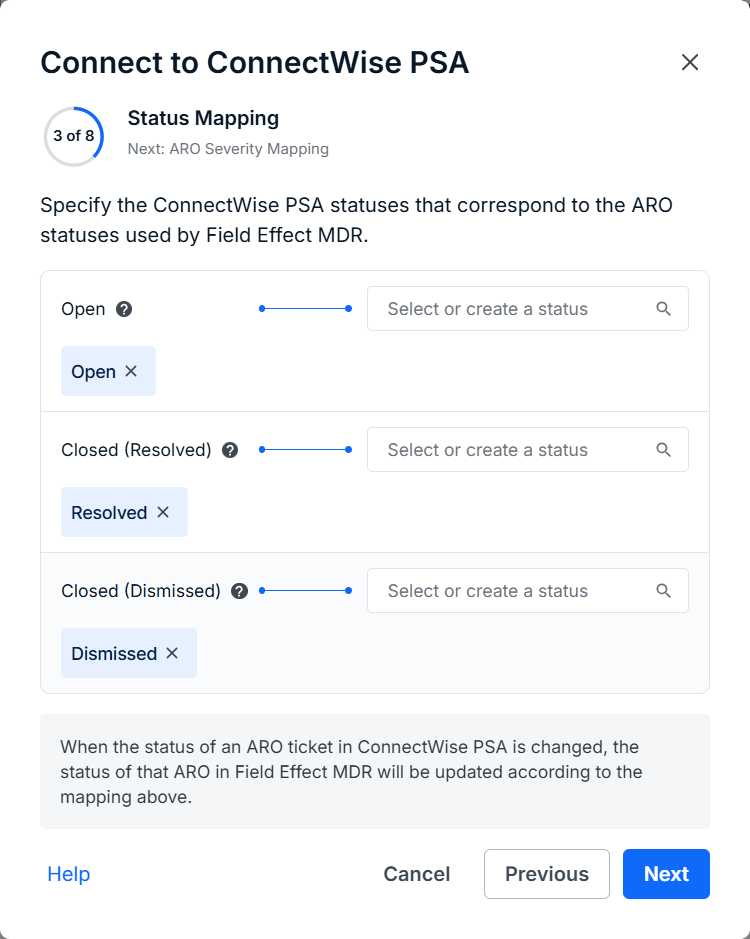
To resolve this issue, make sure that every ConnectWise status has been appropriately mapped to a corresponding ARO status.
Re-Mapping Statuses
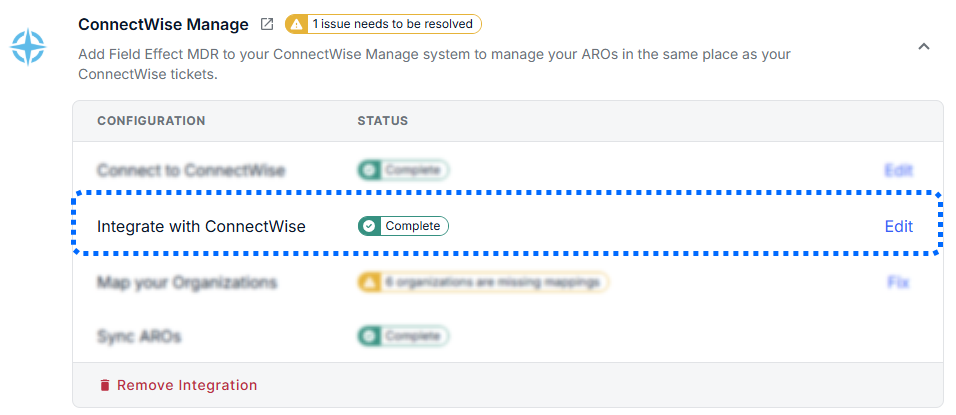
To map statuses that are missing, navigate to the Administration > Integrations page. On the page's IT Service Management tab, select the Edit button for Integrate with ConnectWise.
From here, add any status that may be assigned to an ARO. See For Partners: ConnectWise or For Clients: ConnectWise for more.
Was this article helpful?
That’s Great!
Thank you for your feedback
Sorry! We couldn't be helpful
Thank you for your feedback
Feedback sent
We appreciate your effort and will try to fix the article