Introduction
This article describes the Field Effect MDR integration with Zscaler.
Integration Details
Field Effect has the ability to integrate with Zscaler, meaning that our appliances have the ability to receive web, mobile, and firewall logs from Zscaler cloud, analyze them using Field Effect MDR, and report on them via insights, reporting or ARO when appropriate.
This article describes our integration with Zscaler and provides links to their documentation for deploying Nanolog Streaming Service (NSS) in a virtualized environment.
Zscaler Deployment Guides:

While this article explains our integration at a high-level, see Zscaler's detailed deployment guide for your environment:
- NSS Deployment Guide for Amazon Web Services
- NSS Deployment Guide for Google Cloud Platform
- NSS Deployment Guide for Microsoft Azure
- NSS Deployment Guide for VMware vSphere
VM-Based Nanolog Streaming Service (NSS)
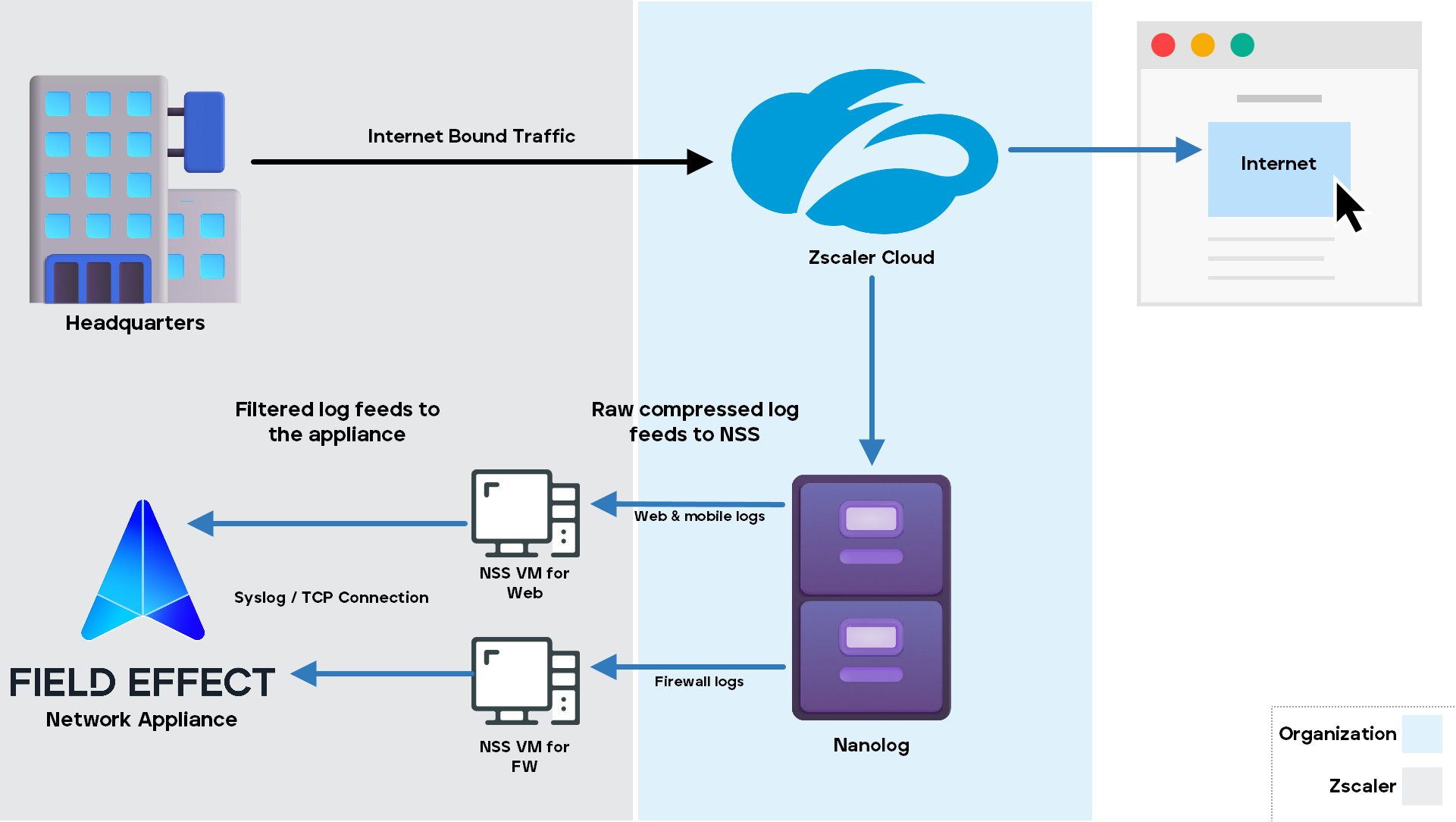
Zscaler's Nanolog Streaming Service (NSS) makes this integration possible by letting Zscaler communicate via the cloud with third-party security solutions, like Field Effect, to exchange event logs.
Once enabled and configured, NSS will stream all logs from the Zscaler Nanolog to your Field Effect network appliance.
Zscaler offers several methods to do this, but this integration uses the Virtual Machine (VM)-based NSS. Once deployed, this integration enables real-time alerting on security events of your choice, as well as the correlation of Zscaler's logs with logs from other devices and locally set up long-term log archives.
With the VM-based approach, NSS uses a virtual machine (VM) to stream logs to your network appliance for analysis, over a raw TCP connection. You can deploy this VM in vSphere, Amazon Web Services (AWS), Google Cloud Platform, or Microsoft Azure. Zscaler stores Web and Firewall logs in the Nanolog, located in the Zscaler cloud.
Each NSS (Firewall NSS and Web NSS) opens a secure tunnel to the Nanolog. Zscaler streams a copy of each log to its respective NSS VM in a highly compressed format, reducing the bandwidth footprint.The Nanolog retains all original logs.
When an NSS VM receives the logs, it decompresses and detokenizes them, then applies the configured filters to exclude unwanted logs. These filtered logs are then converted into an output format that allows them to be consumed and parsed by Field Effect, and then streamed over a raw TCP connection. Setting up Zscaler for Field Effect, below, includes the output formatting we require.
Setting up the Integration
When setting up this integration, please take the following into consideration:
- While we support firewall logs and weblogs - we suggest starting with firewall logs.
- Configure the virtual machines so they can route to the Field Effect appliance's IP address and send syslogs to that IP on port 5514.
Using the appropriate deployment guide for your environment, use our recommended settings below when prompted to provide them.
When setting up the syslog outputs, set the following parameters as such:
- Firewall Log Type: Both Session and Aggregate Logs
- Feed Output Type: Custom
- Timezone: GMT
- Duplicate Logs: Disabled
- Feed Escape character: <empty>
Firewall Output Format:
Use the following output format for your webhook syslog format.
<31>1 %04d{yyyy}-%02d{mth}-%02d{dd}T%02d{hh}:%02d{mm}:%02d{ss}.000Z %s{devicehostname} zscaler-nss-fw - - -
"FW","%s{time}","%s{login}","%s{dept}","%s{location}","%d{cdport}","%d{csport}","%d{sdport}","%d{ssport}","%s{csip}","%s{cdip}","%s{ssip}","%s{sdip}","%s{tsip}","%d{tsport}","%s{ttype}","%s{action}","%s{dnat}","%s{stateful}","%s{aggregate}","%s{nwsvc}","%s{nwapp}","%s{ipproto}","%s{ipcat}","%s{destcountry}","%d{avgduration}","%s{rulelabel}","%ld{inbytes}","%ld{outbytes}","%d{duration}","%d{durationms}","%d{numsessions}","%s{ipsrulelabel}","%s{threatcat}","%s{threatname}","%s{deviceowner}","%s{devicehostname}"\n
Weblog Output Format:
Use the following output format for your webhook syslog format.
<31>1 %04d{yyyy}-%02d{mth}-%02d{dd}T%02d{hh}:%02d{mm}:%02d{ss}.000Z %s{devicehostname} zscaler-nss-web - - - "WL","%s{time}","%s{tz}","%s{elogin}","%s{proto}","%s{eurl}","%s{action}","%s{appname}","%s{appclass}","%d{reqsize}","%d{respsize}","%s{urlclass}","%s{urlsupercat}","%s{urlcat}","%s{malwarecat}","%s{threatname}","%d{riskscore}","%s{dlpeng}","%s{dlpdict}","%s{elocation}","%s{dept}","%s{cip}","%s{sip}","%s{reqmethod}","%s{respcode}","%s{eua}","%s{ereferer}","%s{ruletype}","%s{rulelabel}","%s{contenttype}","%s{unscannabletype}","%s{deviceowner}","%s{devicehostname}","%s{keyprotectiontype}"\nZscaler Deployment Guides:
While this article explains our integration at a high-level, see Zscaler's detailed deployment guide for your environment:
- NSS Deployment Guide for Amazon Web Services
- NSS Deployment Guide for Google Cloud Platform
- NSS Deployment Guide for Microsoft Azure
- NSS Deployment Guide for VMware vSphere
Was this article helpful?
That’s Great!
Thank you for your feedback
Sorry! We couldn't be helpful
Thank you for your feedback
Feedback sent
We appreciate your effort and will try to fix the article