Introduction
The Field Effect DNS Firewall service tracks and blocks access to domains associated with malicious web sites. Setting up and configuring the service is all managed through your my.fieldeffect.net portal.
Once everything is set up and configured correctly, you may notice that the DNS Firewall is not blocking or recording any traffic.
Method 1: check DNS connectivity
Begin by navigating to https://www.dnscheck.tools/. The site displays the following results page:
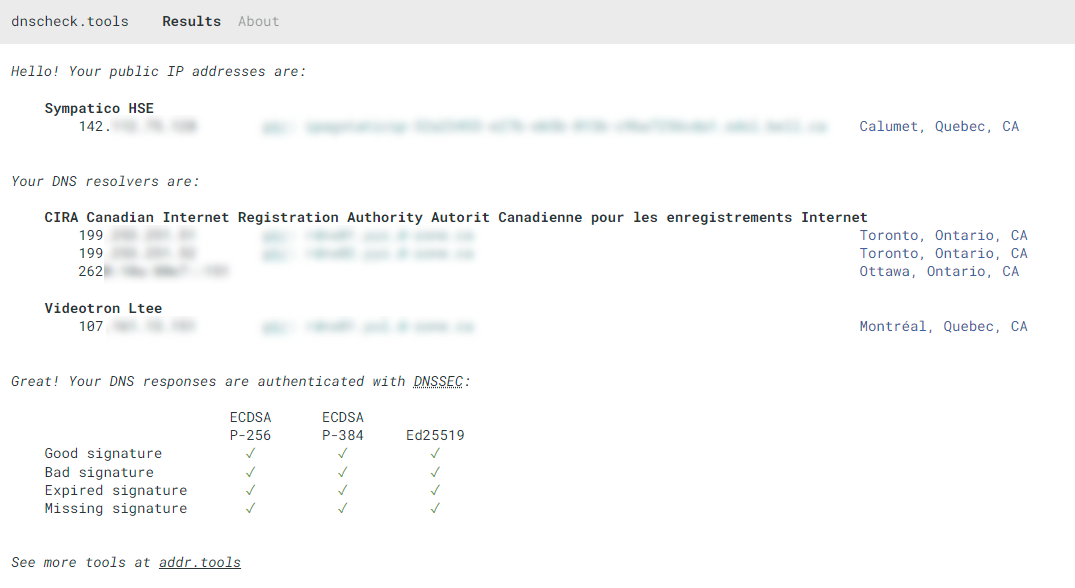
This page will present you with some information regarding your public IP address(es). Add all of these public addresses to the IPs section of your Service Profile. If you didn't add these IPs to your profile, your DNS Firewall may have connectivity issues. To learn how to add IP addresses to your service profile, visit Monitoring Profile: Overview.
f this doesn't fix the issue and the IPs are in your Service Profile, take a screenshot of the results from https://www.dnscheck.tools/ and include it in your support request. We will use this information for further investigation.
Method 2: check the feature's configuration
1) First, double-check that your DNS is configured to point the Field Effect DNS Firewall servers (162.219.50.2 / 162.219.51.2).
Your device may get its DNS resolution from an internal DNS server; in that case make sure that the Field Effect DNS Firewall servers are configured as DNS Forwarders.
2) To verify that your DNS Firewall service is configured properly, browse to the test site at :
3) If you get a timeout or "site not found" message, double-check your external IP and DNS by browsing to:
- Ensure the public IP that the test returns is part of your MDR monitoring profile. ThThe DNS Firewall uses that IP to authenticate DNS resolution requests, and if it has no record of your originating IP, it drops your request.
- Ensure that the returned DNS servers are as expected. The Field Effect DNS Firewall leverages Cira and d-zone servers, so those should be in the list.
4) If you have other DNS servers listed, your Internet service provider may be transparently re-routing your DNS requests. For example, a Comcast service called Security Edge affects subscribers by overriding all customer-specific DNS queries and routing them through Comcast's own DNS servers, bypassing the Field Effect DNS Firewall service.
If you intend to use the Field Effect DNS Firewall and are a Comcast customer, you should disable the Security Edge service.
Was this article helpful?
That’s Great!
Thank you for your feedback
Sorry! We couldn't be helpful
Thank you for your feedback
Feedback sent
We appreciate your effort and will try to fix the article