Introduction
User permissions determine what each user can see and do within the Field Effect MDR Portal. By assigning the appropriate permissions, organizations can ensure users have access to the tools and information they need while maintaining security and administrative control.
Administrators can edit a user's permissions at any time to align access with their responsibilities. For example, permissions can be updated when a user changes roles, requires additional access to manage MDR services, or no longer needs access to certain features. The MDR Portal provides flexible permission settings that allow administrators to manage access across key areas of the platform, helping organizations follow the principle of least privilege while ensuring users can perform their required tasks.
This article covers the following:
Before you Begin
To edit user permissions, you must have the necessary administrative privileges within the MDR Portal. If you cannot access user management settings, contact another administrator in your organization for assistance.
Permission Level Overview
A user in the Field Effect MDR Portal can be granted one the following permission levels:
| Role | Client Users | Partner Users |
|---|---|---|
| Admin | Can perform any action available in the MDR Portal. | Includes all capabilities granted to the Edit role, in addition to the ability to manage the following settings (for all end-client organizations): - Active Response - Agent Protection |
| Edit | Includes all the abilities granted to the View role, in addition to the ability to manage AROs. | Includes all the abilities granted to the View role, in addition to the ability to manage the following settings (for all end-client organizations): - ARO management - Monitoring Profiles - DNS Firewall - SEAS |
| View | Can log into the MDR Portal and view AROs, Reports, and Dashboards. Cannot interact with AROs or view administrative settings. | Can log into the MDR Portal and view AROs, Reports, and Dashboards. Cannot interact with AROs or view administrative settings. |
Procedure
To edit a user's permission:
- Log into the MDR Portal.
- If you are a partner, use the organization selector to select the appropriate view. When se to the partner view, you can manage users that belong to your MSP organization.
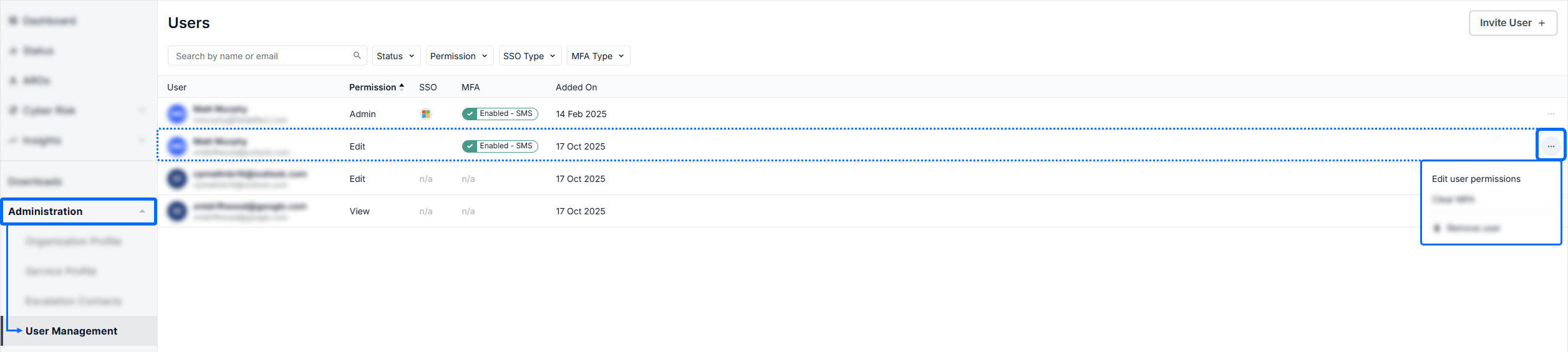
- Navigate to Administration > User Management.
- Open the ellipses for the user you want to edit, and click Edit user Permissions
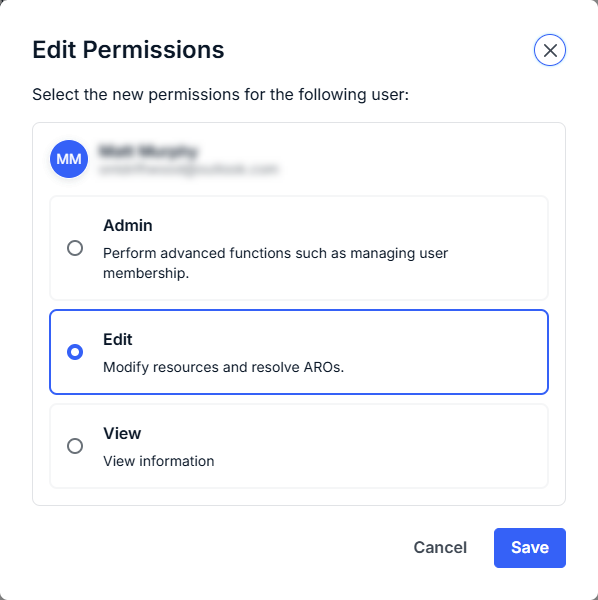
The Edit Permissions window will open. You can change the user’s permission level via the checkmarks. After selecting the proper permission level for the user, click Update.
Was this article helpful?
That’s Great!
Thank you for your feedback
Sorry! We couldn't be helpful
Thank you for your feedback
Feedback sent
We appreciate your effort and will try to fix the article